Best Intel Cpu Buying Guide — Black Friday Deals 2026
Choosing an Intel CPU for Black Friday starts with the system you want to put together, not with a seasonal label or a headline specification. These three options point toward different priorities: a desktop processor that requires discrete graphics, a model with integrated graphics and a high listed core count, and a DDR5-only option with an integrated AI accelerator. Those distinctions can shape your parts list before you compare offers.
Use this guide as a decision journal: note your motherboard, memory plan, graphics approach and everyday tasks, then see which processor fits those constraints. Black Friday is a useful time to compare the exact listing and model, but no offer should substitute for checking the details of the build you intend to complete.
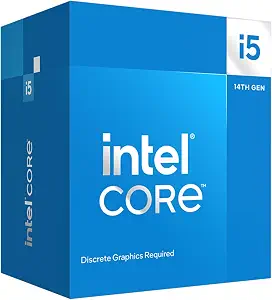
Best Budget is an editorial fit for the Intel Core i5-14400F in this group, not a claim that it has the lowest current price. Its 10 cores—6 P-cores plus 4 E-cores—and 16 threads give shoppers concrete details to weigh against their intended desktop tasks. The listed maximum frequency is up to 4.7 GHz, and the processor has 20MB Cache. Treat those as specifications to compare, rather than as a promise about how a particular application or game will perform. For Black Friday, consider whether this set of features aligns with the work and play you actually expect from the finished system.
This model calls for a discrete graphics plan: its listing says discrete graphics are required. That makes the processor a more considered choice for someone already planning a separate graphics card, or willing to make that part of the build, than for a shopper expecting to rely on graphics built into the processor. The included RM1 thermal solution is another stated part of the package. Keep both details on your parts checklist, and confirm that the exact processor listing matches what you intend to buy rather than assuming a similar model has the same bundle or graphics requirements.
Platform flexibility is a central reason to shortlist this processor. It supports DDR4 and DDR5 memory and is compatible with Intel 600-series motherboards, with a potential BIOS update, and 700-series chipset-based motherboards. It also supports PCIe 5.0 and 4.0. These details do not remove the need to verify your particular motherboard and memory combination: check the board model and BIOS situation, then confirm which memory generation it accepts. During Black Friday, compare the exact offer against that complete plan. This is a sensible candidate when its listed memory support, discrete-graphics requirement and board compatibility line up with your build priorities.
Key specs
Cores and threads
10 cores (6 P-cores plus 4 E-cores) and 16 threads
Maximum frequency
Up to 4.7 GHz
Cache
20MB Cache
Motherboard compatibility
Compatible with Intel 600-series (with potential BIOS update) and 700-series chipset-based motherboards
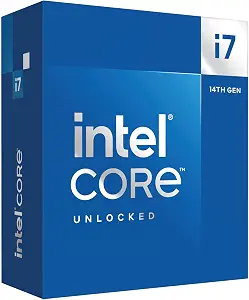
Best Overall is the editorial label for the Intel Core i7-14700K among these featured processors; it is not a measured ranking or a market-wide award. Its listed configuration is 20 cores—8 P-cores plus 12 E-cores—and 28 threads, with a maximum frequency of up to 5.6 GHz using Turbo Boost Max Technology 3.0. Those figures give shoppers a different set of tradeoffs to consider than the i5-14400F’s listed configuration. They do not guarantee a particular result in a workload. If you are comparing Black Friday offers, ask whether these stated characteristics suit the kind of desktop you have in mind, rather than choosing by the label alone.
This processor includes integrated Intel UHD Graphics 770. That provides a different graphics-planning option from a processor whose listing requires discrete graphics, but it is still worth deciding what graphics arrangement your intended system needs. The product facts do not specify how it will perform in any particular application, so match the feature to your own requirements without treating its presence as a performance promise. Its DDR4 and DDR5 platform support may also be relevant if you are comparing memory plans; the motherboard you choose remains part of that decision.
The i7-14700K is compatible with Intel 600-series motherboards, with a potential BIOS update, or 700-series chipset-based motherboards. Check the exact board and its BIOS details before purchase, and make sure its memory support matches your selected DDR4 or DDR5 kit. Black Friday listings can put several configurations or product variants in front of a shopper, so verify the model identifier and the precise item in the offer. This option earns its Best Overall role here because its listed features offer a broad set of considerations—core and thread counts, integrated graphics, frequency and memory-platform support—not because a label can settle whether it is right for your individual build.
Key specs
Cores
20 cores (8 P-cores plus 12 E-cores)
Threads
28 threads
Integrated graphics
Integrated Intel UHD Graphics 770 included
Maximum frequency
Up to 5.6 GHz with Turbo Boost Max Technology 3.0
Motherboard compatibility
Compatible with Intel 600-series (with potential BIOS update) or 700-series chipset-based motherboards
Memory support
DDR4 and DDR5 platform support
Intel Core Ultra 9 Desktop Processor 285K
Best for a DDR5-focused build with an integrated AI acceleratorCheck Price on Amazon
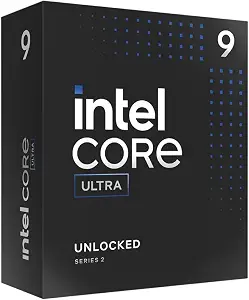
Best for a DDR5-focused build with an integrated AI accelerator describes the Intel Core Ultra 9 Desktop Processor 285K’s specific appeal in this selection. Its listing identifies 24 Processing Units, made up of 8 Performance plus 16 Efficient, and a maximum turbo frequency of up to 5.7 GHz. It also names an integrated Intel AI Boost NPU. Those are useful decision points for someone who already wants a DDR5 build and considers an integrated AI accelerator a priority. They do not establish how quickly a particular program will run or what an AI task will accomplish, so keep expectations tied to the features actually listed.
The 285K supports DDR5 memory and uses the LGA 1851 processor socket. That gives this choice a distinct platform checkpoint: before considering a Black Friday offer, verify that the motherboard you plan to use is a match for the processor’s socket and your intended memory. Do not assume that a board suitable for one of the other featured processors will work here; the listed LGA 1851 detail should guide your motherboard research. The supplied facts do not name compatible motherboard chipsets, so consult the exact board and processor listing for that decision rather than filling in a guess.
Integrated graphics are included, and the processor is identified as unlocked. Those details may matter to shoppers who want to account for integrated graphics or who specifically value an unlocked desktop processor, but they are not substitutes for a complete parts check. Confirm the exact processor variant, motherboard, DDR5 memory and graphics plan before placing an order. The Best for label is a narrow editorial recommendation grounded in the listed DDR5 support and Intel AI Boost NPU, not a claim that the 285K is best for every shopper. During Black Friday, compare its exact offer with the requirements and priorities you wrote down for your build.
Key specs
Processing units
24 Processing Units (8 Performance + 16 Efficient)
Max turbo frequency
Up to 5.7 GHz max turbo frequency
Processor socket
LGA 1851
Memory support
Supports DDR5 memory
Integrated graphics
Integrated graphics included
AI accelerator
Intel AI Boost NPU integrated
Processor status
Unlocked desktop processor
Write down the build’s fixed points before Black Friday
A useful shortlist begins with the parts and requirements that are already settled. Record your motherboard model, the memory generation it supports, and whether your graphics plan relies on a discrete card or on integrated graphics. Then compare those notes with the product facts. The i5-14400F requires discrete graphics and lists compatibility with Intel 600-series boards, potentially with a BIOS update, and 700-series chipset-based boards. The i7-14700K also lists compatibility with those board series, with the same potential BIOS-update consideration. The 285K specifies an LGA 1851 socket and DDR5 support; the supplied facts do not identify its compatible chipset series.
This exercise prevents a headline offer from distracting you from an essential mismatch. If you have not chosen a motherboard yet, treat processor and board as a connected decision, and verify compatibility using the exact board details rather than the family name alone. If you already own a board, confirm the exact model and BIOS situation before assuming an upgrade is straightforward. During Black Friday, write down the processor model as well as the offer details. That makes it easier to distinguish the intended item from a listing or variant that may look similar while not matching your parts plan.
Treat memory support as a platform choice
Memory support can narrow this selection before you compare core counts. The i5-14400F supports DDR4 and DDR5 memory, and the i7-14700K lists DDR4 and DDR5 platform support. The Core Ultra 9 285K supports DDR5 memory. Those statements describe supported memory generations; they do not mean that DDR4 and DDR5 can be mixed on one motherboard. Check the board’s specific memory requirements and select a compatible memory kit for that board.
For a system that already has a motherboard or memory, write down the generation and exact board model first. For a new build, choose the board and memory as a pair, then see which processors remain suitable. This also gives Black Friday comparisons a practical frame: compare the exact processor offer only after checking whether it fits the platform you would actually assemble. A processor listing can support more than one memory generation while a particular motherboard still determines which one your finished build can use. Do not let a broad support statement replace that model-level check.
Make the graphics plan explicit before comparing offers
The graphics distinction among these processors is especially important for shoppers planning a desktop around existing parts. The i5-14400F listing says discrete graphics are required. The i7-14700K includes integrated Intel UHD Graphics 770, and the Core Ultra 9 285K includes integrated graphics. If your plan depends on a discrete card, account for that deliberately; if you want integrated graphics to be part of the system plan, compare the two listings that explicitly include them. The supplied facts do not establish performance for any particular graphics workload.
Before Black Friday, note whether a graphics card is already part of your build plan, still needs to be selected, or is not something you want to include. Then check the exact processor facts and item variant. That simple question can prevent choosing the i5-14400F while overlooking its stated requirement. Conversely, the presence of integrated graphics should not be treated as proof that a processor meets every graphics need. Match the listed feature to the work you intend to do, and research the specific requirements of that work separately.
Compare Black Friday listings by the exact processor
A seasonal label does not tell you whether a listing fits your project. Compare the complete processor name and model identifier, then read the specific offer details and confirm the product variant. Check the attributes that can change your decision: socket or motherboard compatibility, memory support, graphics requirements, and any included thermal solution. For the i5-14400F, the RM1 thermal solution is listed as included. Do not assume the same inclusion for the other processors, because it is not stated in the supplied facts.
Make a small comparison note for each item you are considering: which build constraint it meets, which decision remains open, and what you still need to verify. For instance, the i7-14700K’s listing includes integrated graphics and names compatibility with Intel 600-series boards, potentially with a BIOS update, or 700-series chipset-based boards. The 285K’s listed LGA 1851 socket makes its board match a specific research checkpoint. Use Black Friday to compare the actual offer against those needs; do not treat the event name as proof of a discount, a particular configuration, or a better fit.
Use everyday tasks to weigh the listed specifications
Consider how your desktop will be used, but keep the decision tied to facts rather than assumed performance. If you want to compare the processors by their listed configurations, the i5-14400F has 10 cores and 16 threads; the i7-14700K has 20 cores and 28 threads; and the 285K lists 24 Processing Units, divided into Performance and Efficient units. The figures use the terminology provided for each model, so avoid treating them as a direct prediction of speed in a specific task. Their maximum-frequency details also differ in wording and qualification: compare the exact listing rather than assuming the numbers alone settle your choice.
Write down the kinds of tasks you expect, such as the applications you plan to use or whether the system is for mixed everyday activities, and identify any required features before comparing specifications. If an integrated AI accelerator is a priority, the 285K explicitly lists Intel AI Boost NPU. If integrated graphics matter, the i7-14700K and 285K list them. If memory flexibility is important, the i5-14400F and i7-14700K list DDR4 and DDR5 support. Revisit this note when comparing Black Friday offers so the final choice follows your priorities, not a number considered in isolation.
Make your Black Friday choice
A good Intel CPU shortlist is one that respects the rest of the build. The i5-14400F, i7-14700K and Core Ultra 9 285K each bring different listed considerations, from discrete-graphics requirements and memory support to integrated graphics, socket and an AI accelerator. Check the exact motherboard, memory and graphics plan, then compare the precise item you intend to order. Black Friday can prompt a timely comparison, but the right choice is the processor whose verified details fit your system and priorities.