Best Fire Tv Buying Guide — Black Friday Deals 2026
Will your next Fire TV mainly make everyday streaming easier, or do you want a particular picture or audio format too? That question narrows this shortlist quickly: the Fire TV Stick HD focuses on Full HD, the 4K Select offers 4K Ultra HD with HDR10+, and the 4K Plus adds Dolby Vision and Dolby Atmos. Each has a different set of controls and connected-device features, so compare the details against your television and routine rather than choosing by name alone. Black Friday can make several listings look tempting, but an offer only matters if it is for the model and features you actually want. Use this guide to sort the differences before checking the exact listing.
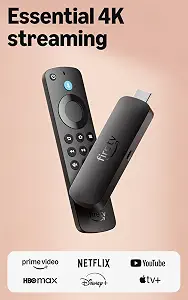
Best Budget is the editorial label for the Amazon Fire TV Stick HD, a straightforward choice when Full HD is the resolution you want. Its listed picture and connectivity features are crisp Full HD and Wi-Fi 6 support. Rather than paying attention to a deal headline alone during Black Friday, first decide whether Full HD meets your needs. If it does, the HD model’s relevant features may matter more than 4K formats you do not plan to use. The label reflects its place in this three-product guide; it does not make a claim about market-wide pricing or prove that it will be the least expensive listing.
The stick connects directly to your TV’s HDMI port, with the product information stating that it does so without blocking other ports. It is powered by your TV with the included USB-C cable. Those details make the connection and power arrangement worth checking before checkout: confirm there is an HDMI port available and consider where the cable will run in your setup. The remote has dedicated power and volume buttons for controlling a compatible TV, soundbar, and receiver. That can be useful if you prefer basic viewing controls close at hand rather than reaching for multiple compatible-device remotes.
Voice control adds another everyday option. Press the voice remote button and speak naturally to find what to watch across your apps, manage your smart home, or explore virtually any topic. For quieter viewing, you can connect Bluetooth headphones for private listening without disturbing people nearby. Those features give the HD model uses beyond simply streaming a picture, while its resolution remains Full HD. On Black Friday, compare the exact HD listing with the 4K options and decide which tradeoff is meaningful to you: a Full HD picture with the listed Wi-Fi 6 support, or a device whose stated features include 4K formats. Pick this model when Full HD is sufficient and its connection, remote, voice control, and headphone options fit the way you watch.
Key specs
Picture and connectivity
crisp Full HD and Wi-Fi 6 support
Connection
Connects directly to your TV’s HDMI port without blocking other ports.
Power
powered by your TV with the included USB-C cable
Remote control
Control your compatible TV, soundbar, and receiver with dedicated power and volume buttons.
Voice control
Press the voice remote button and talk naturally to find what to watch across your apps, manage your smart home, or dive into virtually any topic.
Bluetooth listening
Connect your Bluetooth headphones for private listening to watch TV without disturbing those around you.
Best Overall is the editorial fit for shoppers who want a 4K Fire TV option with a defined set of picture features and broad app choices. The Fire TV Stick 4K Select supports 4K Ultra HD and HDR10+. If those formats match the television and content you plan to use, they give you a clear reason to consider this model over a Full HD stick. The listing also names Prime Video, Netflix, YouTube, Disney+, Apple TV+, HBO Max, Hulu, Peacock, Paramount+, and thousands more. App availability is a practical part of the choice: check that the services you use are among the ones you need, rather than assuming every device or subscription includes access.
Setup is described as plugging in and connecting to Wi-Fi for streaming. Alexa voice search lets you ask to search for and launch shows across your apps, which may suit a household that prefers speaking a title over navigating to it. The listing also says the device can control a compatible smart home. For someone who wants streaming and some connected-home control from one device, those details make the 4K Select a broadly useful option without requiring a more specialized reason to choose it. Cloud gaming is another listed use, but it has an important separate requirement: an Xbox Game Pass subscription and compatible controller are required, and each is sold separately.
At Black Friday, treat Best Overall as a shortlist label, not a claim that this is the best choice for every television or viewer. It is an editorial choice among the three products here. Compare the exact Fire TV Stick 4K Select listing with the other models, and make sure 4K Ultra HD and HDR10+ are relevant to your setup. If Wi-Fi details are decisive, note that this listing says to connect to Wi-Fi but does not specify a Wi-Fi generation in the supplied information. Don’t assume a particular standard from the model name. Choose it when its stated formats, apps, voice search, and smart-home control fit your priorities; set aside cloud gaming unless you also plan for its separately sold requirements.
Key specs
Video format
4K Ultra HD with High Dynamic Range 10+ (HDR10+)
Setup
Plug in and connect to Wi-Fi for smooth streaming.
Voice search
Press and ask Alexa to search and launch shows across your apps.
Streaming apps
Prime Video, Netflix, YouTube, Disney+, Apple TV+, HBO Max, Hulu, Peacock, Paramount+, and thousands more.
Cloud gaming requirements
Xbox Game Pass subscription and compatible controller required. Each sold separately.
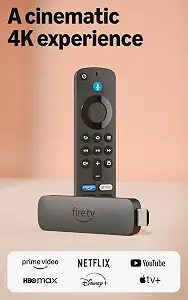
Best for Dolby Vision and Dolby Atmos is the editorial label for the Amazon Fire TV Stick 4K Plus. Its listed picture and audio formats are Dolby Vision, HDR10+, and immersive Dolby Atmos audio, alongside vibrant 4K Ultra HD. That combination gives shoppers who specifically want those named formats a clear reason to examine this model. Before choosing it, check which formats matter for your television and the content you expect to watch. The label describes a fit among the products in this guide; it is not a measured superiority claim or a promise that every program will use every format.
The 4K Plus supports Wi-Fi 6, and its voice search lets you talk naturally to find what to watch across your apps. Its remote controls TV power and volume, so the listed controls are relevant if you want those functions on one remote. The same remote can control compatible smart-home devices such as cameras and lights. Consider whether you would actually use that control from your viewing spot; a feature is most useful when it fits an ordinary routine, not merely because it appears on a product page.
For Black Friday, compare this exact 4K Plus variant with the 4K Select rather than treating the words “4K” as the whole distinction. The Plus specifically lists Dolby Vision and Dolby Atmos, while the Select lists 4K Ultra HD and HDR10+. Both have voice search in the supplied information, but their stated formats differ. The HD model, meanwhile, is the Full HD option and lists Bluetooth headphone listening. Keep your decision anchored to the formats and controls you want, and check the precise product name on the offer before buying. The 4K Plus makes sense when its named picture and audio formats, Wi-Fi 6 support, and remote-based controls suit your setup.
Key specs
Streaming resolution
vibrant 4K Ultra HD
Wi-Fi
Wi-Fi 6 support
Picture and audio formats
Dolby Vision, HDR10+, and immersive Dolby Atmos audio
Voice search
talk naturally to find what to watch across your apps
Remote controls
control TV power and volume with one remote
Smart home control
Control compatible devices like cameras, lights, and more with your remote.
Match the format names to your viewing plan
Start with the kind of picture format you want, not the promise of a seasonal bargain. The HD stick lists crisp Full HD. The 4K Select lists 4K Ultra HD with HDR10+, and the 4K Plus lists vibrant 4K Ultra HD, Dolby Vision, and HDR10+. Those details make the choice more precise than simply asking which product has “better” picture. Think about your television and the content you plan to watch, then decide whether Full HD is enough or whether the listed 4K formats are relevant to you. Format names are not interchangeable, so compare the exact capabilities in each listing.
If a Black Friday listing emphasizes a feature you will not use, it may not be the right fit even if the headline sounds attractive. Likewise, a product name containing “4K” should prompt you to check the complete model name and its stated formats, not assume that every 4K stick has identical features. The supplied information identifies HDR10+ for both 4K models, while Dolby Vision appears on the 4K Plus listing. Use those distinctions to make a short, reasoned choice: Full HD for the HD model, 4K Ultra HD and HDR10+ for either 4K option, and Dolby Vision when it is a priority for your setup.
Consider sound as well as the screen
Picture is only one part of a streaming setup. The Fire TV Stick 4K Plus lists Dolby Atmos audio as well as its picture formats, making it the model to examine if that named audio format is important to you. The provided information for the HD and 4K Select does not list Dolby Atmos; that is not a reason to assume anything beyond what is stated, but it is a useful distinction when comparing these records. Check the exact listing and consider whether the audio capability is relevant to the equipment and content you plan to use.
A different kind of listening decision appears on the HD stick: it can connect to Bluetooth headphones for private listening, so you can watch without disturbing people around you. That may be a more practical priority than a format label for someone who often watches while others are nearby. The 4K Plus and 4K Select entries do not state this headphone feature, so avoid assuming it is included there. During Black Friday, write down whether your priority is a named audio format or private headphone listening before comparing offers. This keeps a loud deal headline from distracting you from the listening situation you actually need to solve.
Check the controls you will reach for
Remote details can make a real difference to how you use a streaming stick day to day. The HD remote has dedicated power and volume buttons for a compatible TV, soundbar, and receiver. The 4K Plus remote controls TV power and volume with one remote. Those descriptions are similar in purpose, but check the exact wording for your chosen model and the devices you want to control. The 4K Select listing highlights Alexa voice search for finding and launching shows across apps. The HD and 4K Plus also list voice search, with the HD remote button used to speak naturally and the Plus described as natural voice search across apps.
Ask yourself how you normally look for a program. If you know the title, voice search may be convenient; if you prefer browsing, that feature may be less important to your choice. Smart-home control is also listed for all three in different terms: the HD voice remote can manage a smart home, the Select can control a compatible smart home, and the Plus remote can control compatible devices such as cameras and lights. Black Friday may put remote features in small listing text, so verify the model and controls rather than presuming they are identical across the Fire TV range.
Plan the connection and any extras
Before ordering, consider the physical setup as carefully as the streaming features. The HD stick connects directly to an HDMI port and is described as not blocking other ports; its power comes from the TV with the included USB-C cable. The 4K Select is described as plug in and connect to Wi-Fi. The supplied details for the 4K Plus list Wi-Fi 6 support. These are distinct pieces of information, so do not transfer one model’s connection or power details to another. Check your intended TV location and the exact listing for the setup information that applies to the model you choose.
Also separate included capabilities from activities that need additional purchases or subscriptions. The 4K Select’s cloud gaming feature requires an Xbox Game Pass subscription and compatible controller, each sold separately. If gaming is not on your plan, that feature need not drive your decision; if it is, account for those requirements rather than treating cloud gaming as a complete package. The HD stick’s Bluetooth headphone feature may be useful for private listening, while the Plus lists smart-home control from its remote. On Black Friday, compare the whole configuration you need, not just a feature name that appears in a promotional headline.
Read the Black Friday listing before deciding
A sound comparison starts by confirming the product name and variant on the offer page. These three options are the Amazon Fire TV Stick HD, Amazon Fire TV Stick 4K Select, and Amazon Fire TV Stick 4K Plus. Similar names do not make their listed capabilities identical. The HD model specifies Full HD and Wi-Fi 6 support; the Select specifies 4K Ultra HD and HDR10+; the Plus specifies 4K Ultra HD, Dolby Vision, HDR10+, Dolby Atmos, and Wi-Fi 6. Match the offer to the exact model you meant to consider before weighing any other details.
Next, compare the features that matter to your own use: app names and voice search, remote buttons, smart-home control, headphone listening, or separate gaming requirements. Do not infer a discount, included accessory, subscription, or capability from a banner; use the live listing’s actual terms to verify what is being offered. Black Friday is a useful time to revisit a shortlist, but a seasonal label cannot tell you whether a model suits your screen, listening preferences, or connected devices. Keep your decision checklist simple: exact model, required format, relevant controls, setup details, and any separate needs. Then choose the listing that meets those priorities.
Make your Black Friday choice
For a final Black Friday decision, start with the screen and sound features you want, then check controls and setup. Choose the Fire TV Stick HD if Full HD, Wi-Fi 6 support, its remote controls, or Bluetooth headphone listening align with your routine. Consider the 4K Select for 4K Ultra HD, HDR10+, its named apps, and voice search, while remembering the separate cloud-gaming requirements. Choose the 4K Plus when its Dolby Vision and Dolby Atmos formats, Wi-Fi 6 support, and remote-based controls fit your plan. Before checkout, verify the exact model and offer details; the right Fire TV is the one whose listed features answer your practical needs.