Best Netgear Router Buying Guide — Black Friday Deals 2026
A Netgear router shortlist is most useful when it starts with the shape of your household’s connection needs, not the biggest specification on a product page. These three Nighthawk models span Wi-Fi 6 and Wi-Fi 7 options, different stated coverage and device capacities, and different wired-port details. The right fit depends on which of those details will affect your everyday setup. During Black Friday, keep the model name and exact variant in view as you compare an offer; a deal is only relevant if it is for the router you meant to choose. This guide explains what each listed feature can help you decide, where a model’s stated details may be a useful match, and what to verify before checkout.
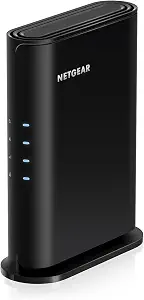
Best Budget is the editorial label for the Nighthawk R6700AX in this guide. It is a useful option to consider if your shortlist calls for Wi-Fi 6 and the listed coverage and connected-device capacity are in keeping with your plans. The label reflects a role among the products featured here; it does not claim a particular price, discount, or market-wide ranking. For Black Friday shoppers, that distinction matters: look at the offer attached to this exact model, then decide whether its stated features meet your needs.
The R6700AX is listed with Wi-Fi 6 speeds up to 1.8 Gbps across the 2.4 GHz and 5 GHz bands. Its stated coverage is up to 1,500 sq. ft., and it is specified for up to 20 connected devices. These details offer a straightforward way to screen the model against your household plans. Think about which rooms need coverage and how many devices you expect to connect, while remembering that the figures are stated limits rather than a promise about every home’s layout or use. If you are comparing it with a Wi-Fi 7 router, decide first whether Wi-Fi 6 is appropriate for the choice you are making; the generation name alone does not settle the rest of the comparison.
Its wired layout includes four 1 Gig Ethernet LAN ports and a separate 1 Gig WAN port for connecting to an existing modem or gateway via Ethernet. That explicit compatibility detail can help if you want to retain your current modem or gateway. Setup is guided through the free Nighthawk app on iOS or Android, and WPA3 encryption is listed for wireless security. These are useful points to check against your preferences, rather than reasons to assume a particular installation outcome or security setup.
The R6700AX may be a sensible shortlist candidate when its stated coverage and capacity fit your plans and you want the listed Wi-Fi 6 feature set. During Black Friday, verify the product identity and exact variant before comparing any offer. Then consider whether the four LAN ports, separate WAN port, app-guided setup, and WPA3 encryption align with the equipment and setup questions you already have. Choosing this model should come from that fit, not from the Best Budget label by itself.
Key specs
Wi-Fi speed
WiFi 6 delivers speeds up to 1.8 Gbps across 2.4 GHz and 5 GHz bands.
Coverage
Covers up to 1,500 sq. ft.
Connected devices
for up to 20 connected devices.
Ethernet LAN ports
Four 1 Gig Ethernet LAN ports
WAN port
A separate 1 Gig WAN port connects to your modem or gateway.
Setup
Download the free Nighthawk app on iOS or Android for guided setup.
Wireless security
WPA3 encryption
Modem compatibility
Pairs with your existing modem or gateway via ethernet.
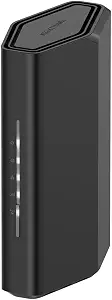
Best Overall is the editorial label for the Nighthawk RS90 because its stated combination of Wi-Fi 7, coverage, device capacity, and a 2.5 Gig WAN port gives shoppers several useful selection points in one model. That label is a practical shortlist choice among these featured routers, not the result of testing or a claim that it is right for every home. If your decision involves both household devices and the connection to your modem, the RS90 offers details to weigh on both fronts.
Its Wi-Fi speed is listed as up to 3.6 Gbps across the 2.4 GHz and 5 GHz bands. NETGEAR states coverage up to 2,000 sq. ft. and capacity for up to 50 devices. Treat those figures as planning information: consider the rooms where you want a connection and the devices that may use it, rather than assuming that a coverage figure guarantees the same experience in every layout. The capacity figure may be especially relevant when a household has a broad mix of connected equipment. During Black Friday, compare these exact RS90 details with the needs you have identified instead of choosing on the basis of a promotion alone.
For wired equipment, the RS90 lists a 2.5 Gig WAN port and four 1 Gig Ethernet LAN ports. The WAN port is the connection point to consider for your modem, while the LAN ports matter if you plan to attach equipment by Ethernet. The product record also gives guided setup through the free Nighthawk app on iOS or Android. That is a concrete setup detail to compare if app-guided installation is a priority. The supplied facts do not specify every networking or security detail, so check the product listing for any additional requirement that matters to you rather than assuming it is included.
The RS90 can make sense when Wi-Fi 7 and the stated capacity for up to 50 devices are central to your shortlist, while its four 1 Gig LAN ports give you a clear point of reference for wired connections. Those details still need to line up with the equipment and rooms in your own home. Before a Black Friday purchase, verify that the offer identifies the RS90 and compare its listed features with your checklist. The model’s editorial label is a starting point for consideration, not a substitute for checking fit.
Key specs
WiFi speed
Up to 3.6 Gbps across 2.4 GHz and 5 GHz bands
Coverage
up to 2,000 sq. ft. of coverage
Device capacity
for up to 50 devices
WAN port
2.5 Gig WAN port
LAN ports
Four 1 Gig Ethernet LAN ports
Setup
Download the free Nighthawk app on iOS or Android for guided setup.
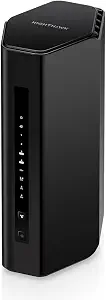
Best for a tri-band setup is the editorial label for the Nighthawk RS300, based on its listed Wi-Fi 7 and Tri-Band details. It gives shoppers who specifically want to consider a tri-band router a distinct reason to put this model on their shortlist. The label does not establish that it performs better in a particular household, and the supplied details do not answer every question about compatibility or setup. Use it as a prompt to compare the RS300’s stated features with your own intended tasks.
NETGEAR lists a data transfer rate of 9.3 gigabits_per_second, coverage up to 2,500 sq. ft., and capacity for up to 100 devices. The product also lists MU-MIMO and OFDMA. For a household weighing many connected devices, that stated capacity can be one useful planning point; the coverage figure can help you think about the area you want to serve. Neither figure predicts the result for every floor plan or device mix, so use them as specifications to compare rather than guarantees. The Black Friday decision is not simply whether this model has a long feature list, but whether the listed features answer needs you actually have.
The RS300’s Ethernet arrangement is listed as 2× 2.5G + 2× Gigabit Ports. That format gives you a concrete starting point for mapping wired equipment to the router: check what you intend to connect and which port types matter for those connections. WPA3 is listed as its security protocol. If wireless security is part of your decision, this provides a specific detail to compare with your requirements. The supplied product facts do not state an app-based setup option for this model, so confirm setup details from the exact listing if that is an important part of your choice.
The RS300 is worth considering when Tri-Band, the stated capacity for up to 100 devices, or its listed Ethernet arrangement is central to your comparison. Those features may be more relevant to some connection plans than others; they do not make the model an automatic fit for every home. During Black Friday, make sure the listing and offer refer to the RS300, then review the feature details that shaped your shortlist. The Best for a tri-band setup label reflects the provided Tri-Band specification, not a test result or promise about your experience.
Key specs
Wi-Fi generation
Wi-Fi 7
Frequency bands
Tri-Band
Data transfer rate
9.3 gigabits_per_second
Coverage
up to 2,500 sq. ft.
Device capacity
up to 100 devices
Ethernet ports
2× 2.5G + 2× Gigabit Ports
Wireless features
MU-MIMO and OFDMA
Security protocol
WPA3
Turn household routines into a router shortlist
Before comparing models, describe the connection tasks you want the router to support. You might be thinking about several people using connected devices in different rooms, equipment that you prefer to attach with Ethernet, or a particular wireless generation you want to consider. Those are separate questions, and the product facts answer them in different ways. Device capacity and coverage help frame a household-scale comparison; Wi-Fi generation and stated speed give another set of details to review; port descriptions matter when you have wired equipment.
Make a short list of priorities rather than treating every specification as equally important. If you expect many connected devices, note that and compare the stated capacities. If the area you want covered is your main concern, put coverage figures beside your room plan, while remembering they are not guarantees for a particular layout. If a modem or gateway is staying in place, look for an explicit connection detail, such as the R6700AX’s stated Ethernet pairing with an existing modem or gateway. This step can make Black Friday browsing more focused: a lower offer on a model that does not fit your priority is not automatically the better choice.
Finally, separate must-haves from nice-to-haves. A household may care most about wireless features, while another may start with the wired connections it needs. Knowing the difference helps prevent a long feature list from distracting you from the task you set out to solve.
Use coverage and capacity as planning cues
Coverage and device capacity describe different considerations. Coverage figures relate to the area the manufacturer says a router can cover, while the device figure indicates the listed capacity for connected devices. Neither is a complete description of how a specific home will experience Wi-Fi. Room arrangement and the devices you actually use are personal details that the supplied product specifications cannot resolve for you. Treat the numbers as a way to narrow options, not a guarantee that every room or connection will behave identically.
The three models present distinct stated planning figures: the R6700AX lists coverage up to 1,500 sq. ft. and up to 20 connected devices; the RS90 lists up to 2,000 sq. ft. and up to 50 devices; the RS300 lists up to 2,500 sq. ft. and up to 100 devices. Rather than assuming you need the largest figures, consider how your own home and connected equipment fit the plans you have. If you are shopping Black Friday, compare the exact model’s stated figures with that plan before looking at the offer as a deciding factor.
For a practical check, write down the areas you want to cover and the devices you expect to connect. Then ask whether the listed figures are relevant to your needs and whether any other feature—such as a particular port arrangement or Wi-Fi generation—should carry more weight. This keeps the comparison grounded in your situation instead of turning specifications into an unsupported promise.
Choose the wireless details that answer your question
The wireless labels in this group are not identical. The R6700AX is a Wi-Fi 6 router with a stated speed up to 1.8 Gbps across 2.4 GHz and 5 GHz bands. The RS90 is Wi-Fi 7, with a stated speed up to 3.6 Gbps across those two bands. The RS300 is also Wi-Fi 7 and is listed as Tri-Band, with a data transfer rate of 9.3 gigabits_per_second. Keep the descriptions attached to their exact models as you compare them; avoid assuming that one number alone describes what a given household will experience.
Start by asking what you want to learn from the wireless specification. If your shortlist is organized around Wi-Fi generation, compare the generation labels. If the number of bands is part of your decision, the RS300’s Tri-Band listing gives you a specific detail to consider. If you are looking at stated speed, keep the accompanying band information and model identity in view. These details can help organize a comparison, but they do not replace checking the needs of your own devices and connection plan.
Black Friday can make quick comparisons tempting, so pause when two listings seem similar. Confirm that you are comparing the same model and variant, then check which wireless description is actually provided for each. A clear question—generation, bands, or stated speed—makes the specification more useful than treating a headline figure as the whole decision.
Plan wired connections before settling on a model
A router’s Ethernet details matter most when you have equipment you intend to connect by cable. First identify those devices and the number and type of connections you want to use. Then compare the port information shown for each model. The R6700AX lists four 1 Gig Ethernet LAN ports and a separate 1 Gig WAN port. The RS90 lists four 1 Gig Ethernet LAN ports and a 2.5 Gig WAN port. The RS300 lists 2× 2.5G + 2× Gigabit Ports. These descriptions are not interchangeable, so read the exact layout rather than relying on a general impression of the model.
The WAN connection and LAN connections have different roles in the provided details. For the R6700AX, the separate WAN port connects to a modem or gateway, and the router is described as pairing with an existing modem or gateway via Ethernet. For the other models, use the supplied port information to compare what is explicitly stated, and check their exact listings for any further connection question you need answered. Avoid assuming an unlisted detail applies just because another model includes it.
This is also a useful Black Friday safeguard: confirm the model and port arrangement before deciding that an offer suits a wired setup. A brief inventory of your planned connections can reveal whether the listed LAN and WAN details match what you are trying to connect.
Make setup and security part of the final review
Setup information can be a meaningful selection point, but it should be checked model by model. Both the R6700AX and RS90 list guided setup through the free Nighthawk app on iOS or Android. If app-guided setup matters to you, that is a clear detail to include in your comparison. The provided RS300 facts do not specify setup instructions, so consult its exact product listing if you need to confirm how setup is handled. Do not fill that gap by assuming the same detail applies across the range.
Security information also differs in what is explicitly supplied. The R6700AX lists WPA3 encryption, and the RS300 lists WPA3 as its security protocol. No wireless-security fact is provided here for the RS90, so check its exact listing if you need that information before buying. This is not a claim that a feature is missing; it is a reminder to distinguish confirmed details from questions that remain open.
As Black Friday approaches in your shopping process, keep a final checklist beside the offer: exact model, the features that matter to your plan, and any setup or security information you still need to verify. Confirming those points makes the promotion secondary to product fit and helps you avoid treating an editorial label as a technical specification.
Make your Black Friday choice
The strongest shortlist is the one that connects a router’s stated features to the tasks you want it to handle. The R6700AX brings a defined Wi-Fi 6 profile, app-guided setup, WPA3, and specified modem or gateway pairing; the RS90 combines Wi-Fi 7 with its listed device capacity and WAN details; and the RS300 offers a Tri-Band Wi-Fi 7 specification, stated capacity, and a different Ethernet arrangement. During Black Friday, compare the exact model and variant, then confirm that its listed details match your priorities. Treat coverage and capacity as planning figures, and check any unanswered setup or security questions in the relevant listing. A considered fit is a more useful reason to choose than a deal alone.